JEDDAH — Crown Prince Mohammed Bin Salman, deputy premier and minister of defense, announced on Thursday Saudi Arabia’s national aspirations and priorities for the research, development and innovation for the coming two decades.
The Crown Prince, who is also chairman of the Supreme Committee for Research, Development and Innovation, has identified four key priorities – human health; environmental sustainability and basic needs; leadership in energy and industry; and future economies.
“This would enhance the Kingdom’s global competitiveness and leadership role, keeping pace with the directives of the Kingdom’s Vision 2030 and strengthen Kingdom’s position as the largest economy in the region,” the Saudi Press Agency reported quoting him as saying.
At the outset of the announcement of the national aspirations and priorities, the Crown Prince said: “We have adopted ambitious aspirations for the research, development and innovation sector, so that the Kingdom will become one of the pioneers of innovation in the world.
The annual spending on the sector will reach 2.5 percent of GDP in 2040, so that the sector contributes to the development and diversification of the national economy by adding SR60 billion to the GDP in 2040, and creating thousands of quality jobs in science, technology and innovation,” he said.
The Crown Prince said the research, development and innovation sector has been restructured in order to ensure the sector’s growth and prosperity. A supreme committee headed by the Crown Prince has been formed to oversee the sector and determine the national priorities and aspirations for research, development and innovation in the Kingdom. Also, the Research, Development and Innovation Authority has been created.
The authority will act as an enabler, legislator and regulator for the sector, and will develop programs, projects, budget distribution and performance monitoring.
In order to achieve the grand ambitions announced by the Crown Prince, the authority will work to attract the best national and international talents. This is in addition to strengthening cooperation with major research centers, international companies, the non-profit sector and the private sector, which are an essential partner to lead research and development and increase investment in the sector.
The total investment in projects supported by the Enterprise Georgia state campaign has exceeded ₾3 billion ($1bln/€980mln) with about 9,000 projects implemented and up to 58,000 jobs created, the agency announced on Thursday.
During the presentation of the Enterprise Georgia’s Economic Impact Assessment Report earlier today, campaign Head Mikheil Khidureli said each Georgian lari co-financed in the programme had generated 15 times the revenue for the businesses and contributed 1.6 times the money to the budget in the form of taxes per year.
Khidureli also noted each co-financed Georgian lari had generated an additional ₾5 ($1.7/€1.6) of gross domestic product, saying the agency’s programmes had a “direct rapid and measurable effect” on the county’s economy. Photo: Enterprise Georgia
The report includes results of 292 beneficiaries of the industrial sector who were selected for evaluation based on data from the last five years.
Georgian Economy Minister Levan Davitashvili, who also attended the event, stressed the importance of creating a “sustainable category” of small and medium-sized businesses that are “most vulnerable”, in efforts to withstand economic shocks.
Additionally, Kidureli announced the launch of a concept for developing a business hub for supporting local business projects in regions of Georgia and providing training in a variety of areas with the support of the United Nations Development Programme and the United States Agency for International Development.
A number of new actions, to support the ongoing delivery of Scotland’s Forestry Strategy, will ensure forests and woodlands continue to deliver benefits for communities, the environment and the economy.
Over the last three years, over 32,000 hectares of woodland have been created in Scotland, including more than 12,000 hectares of native woodland.
These woods are vital in fighting climate change and nature loss, whilst also strengthening our communities and economy.
A new three year Implementation Plan has been published with key actions to maximise the range of benefits that woodlands bring to the people of Scotland.
Mairi McAllan
Announcing the new Plan, Environment Minister Mairi McAllan said: “We are uniquely placed within the UK to enable responsible expansion of nature-based solutions, including increased tree cover.
“We have big ambitions with forestry and to achieve our goals we must work collaboratively. Key to this is ensuring that forestry fits with other land uses and that we plant the right trees in the right places.
“People and communities must also be at the forefront of our efforts to tackle climate change and we will strive to ensure that no-one is left behind or unfairly disadvantaged.
“This new Implementation Plan sets out the key forestry actions required to help us achieve this.”
Some of the actions to be taken forward in partnership include-
Supporting farmers and crofters to realise the benefits of tree planting.
Promoting the use of new wood-based products that can support the decarbonisation of other industries.
Scoping and establishment of a technical training hub.
Establishing a National Register for Ancient Woodlands and encouraging owners to protect and improve their condition.
Developing and implementing a framework to help forestry support community wealth building.
Identifying and pursuing opportunities to decarbonise Scotland’s wood supply chain; and
Promoting the opportunities for people to engage in woodland-based activities to improve mental and physical well-being.
Scotland’s forests and woodlands generate £1 billion to the economy each year and support over 25,000 jobs.
Millions of people visit Scotland’s forests every year for recreation and this improves society’s health and wellbeing.
You can view the new Implementation Plan for Scotland’s Forestry Strategy on this page.
Do you want to respond to this article? If so, click here to submit your thoughts and they may be published in print.
Thiruvananthapuram Mayor Arya Rajendran has said that ‘entrepreneur’ Veena Vijayan was being targetted because of her father’s politics.
“Veena, the entrepreneur is being hunted for the sole reason that she is Pinarayi Vijayan’s daughter,” wrote Arya in a Facebook post on Thursday.
“Allegations against politicians are common. But does the woman named Veena have any responsibility in Kerala’s contemporary politics? She has rights and privacy like anybody else.
“She is being hunted regularly for the past one-and-a-half-decade due to her father’s politics,” wrote Arya, who is a young leader of CM Vijayan’s party, CPM.
Recently, gold smuggling case-accused Swapna Suresh had alleged that Veena Vijayan was the mastermind in the Sprinklr controversy. The UDF, which is the main opposition in the state, has continuously accused the Pinarayi Vijayan government of misusing Keralites’ health data by allowing access to US-based tech firm Sprinklr.
The other day, Congress MLA Mathew Kuzhalnadan had said in the Assembly that he had digital evidence to prove Veena Vijayan’s connection to PricewaterhouseCoopers, which allegedly had undue influence over the top leadership of the LDF government.
The accusation had angered CM Vijayan, who declared Kuzhalnadan’s claims ‘a glaring lie’.
Editorial Note: We earn a commission from partner links on Forbes Advisor. Commissions do not affect our editors’ opinions or evaluations.
PERT charts and Gantt charts are frequently relied on by project managers who are seeking the best organizational options for assigning tasks to team members and keeping track of all the moving parts. Both systems can serve as useful visual tools for arranging project plans and achieving the best outcomes.
Featured Partners
Free version available
Yes
Starting price
From $10 monthly per user
Integrations available
Zoom, LinkedIn, Adobe, Salesforce and more
Free version available
Yes
Starting price
From $9.80 monthly per user
Integrations available
Google Drive, Microsoft Office, Dropbox and more
Free version available
Yes
Starting price
From $4 monthly per user
Integrations available
GitHub, Bitbucket, Crashlytics
The biggest difference between the two is that PERT focuses on a flowchart system, while Gantt offers a linear bar chart.
PERT Chart vs. Gantt Chart: At a Glance
PERT Charts Explained
A PERT (which stands for program evaluation and review technique) chart is a flowchart or network diagram that displays project tasks in separate boxes. Task dependencies are then connected with arrows between the boxes, allowing managers to create project milestones as well as identify any potential obstacles that the team may face.
Features: Elements such as boxes, circles, arrows and lines
Flexibility: Very limited
Best for: Planning before a project starts
Gantt Charts Explained
A Gantt chart (named for the 1910 creator Henry Gantt) is a bar chart that lays out project tasks in a linear timeline. Gantt charts illustrate all the project tasks that will need to be completed, along with the time allotted for each task and task interdependencies. You can use our free Gantt chart template to try building one for yourself.
Features: Elements such as bars, schedules and milestones
Flexibility: Very high
Best for: Implementation once a project is underway
When To Use a PERT Chart vs. a Gantt Chart
PERT charts serve as helpful tools when mapping out a project. Their use of numbers, arrows and task dependencies allow users to quickly see where any potential problems or bottlenecks may occur. When managers are in the beginning stages of project creation, PERT charts can be a vital resource for planning and visualizing.
Gantt charts are best used once projects are underway, particularly if there is the possibility of multiple changes as the timeline progresses. Since they utilize bars and lists, these charts are very flexible in terms of illustrating task durations, interdependencies and resource management.
Bottom Line
Both PERT and Gantt charts are incredibly helpful tools when it comes to project planning and visualization. Choosing the right one for your project will depend on how it may shift as time progresses.
Are you in the planning stage or the implementation stage? PERT charts are the best option if you are mapping out what a project and its timeline will look like. Gantt charts are better used once you are implementing a project and have a team on board.
Once started, do you anticipate the project changing? If the timeline, tasks or goals will evolve at all, sticking with a Gantt chart is your best option. PERT charts are the right choice only when there will be very limited alterations to a project.
The Sheboygan County Economic Development Corporation (SCEDC) and Small Business Development Center (SBDC) at UW-Green Bay have begun their Accelerate Sheboygan County Business Challenge for 2022.
Everyone is encouraged to submit unique products, business ideas, and existing businesses to the challenge.
Applications can be submitted online at AccelSC.com and are due by October 31st.
Each idea submitted is reviewed by professionals and receives guidance free from the SCEDC and SBDC at UW-Green Bay.
Five idea applicants will win a $1,000 grant to go towards business services and drive the idea forward.
In November 2022, five or more applicants will then go on to pitch their idea to business professionals and investors to gain further support and compete for the grand prize of $10,000.
The winner will be announced in December 2022 after the business ideas are presented.
Project management software enables enterprise project teams to visualize each step of their project, including tasks that must be completed and overall project roadmaps. It helps the individuals responsible for each task manage their schedule and communicate with other project stakeholders.
Asana and ClickUp are two major project management tools that give project teams task management, documentation, and collaboration features. Asana and ClickUp both serve businesses of all sizes, including startups, and offer plenty of tools for task tracking. To determine which PM tool is right for your business, consider your organization’s specific needs when comparing ClickUp and Asana based on task management, user experience, customizability, and pricing.
What is Asana?
Asana is both project-focused and user-focused.There are plenty of features for users to track their personal progress, like viewing workloads and portfolios, which are collections of multiple projects. Asana offers a free plan with extensive features and is particularly suitable for smaller businesses and startups, particularly those that don’t have many employees experienced with project management tools.
What is ClickUp?
ClickUp, known as “the one app to replace them all,” is intended to serve as multiple business applications in one, including documentation, communication, and calendar tools.
It has features tailored to multiple departments—for example, product roadmaps, marketing campaign management, and new hire tracking. Product teams can customize each step of a roadmap, marketers have A/B testing templates to track campaign progress, and HR teams can use onboarding templates to manage new employees’ progress.
Because it’s customizable and offers department-specific task design, ClickUp is suitable for businesses in a wide range of industries.
Asana vs. ClickUp: Task management
Asana supports the waterfall approach to project management because its tasks support dependencies, which require another task to be completed before beginning the next one. It also supports agile projects with Kanban board layouts, which allow users to drag and drop tasks between stages, including dragging them to a previous stage if they need to be revised.
Image credit: Asana
Asana users can view status changes on other tasks within their projects. They have four different options for project views: list, board, calendar, and timeline. With options for multiple views, team members are able to use the task visualization format that works best for them. Employees aren’t stuck in a task view that they don’t understand, which gives more flexibility to the whole team.
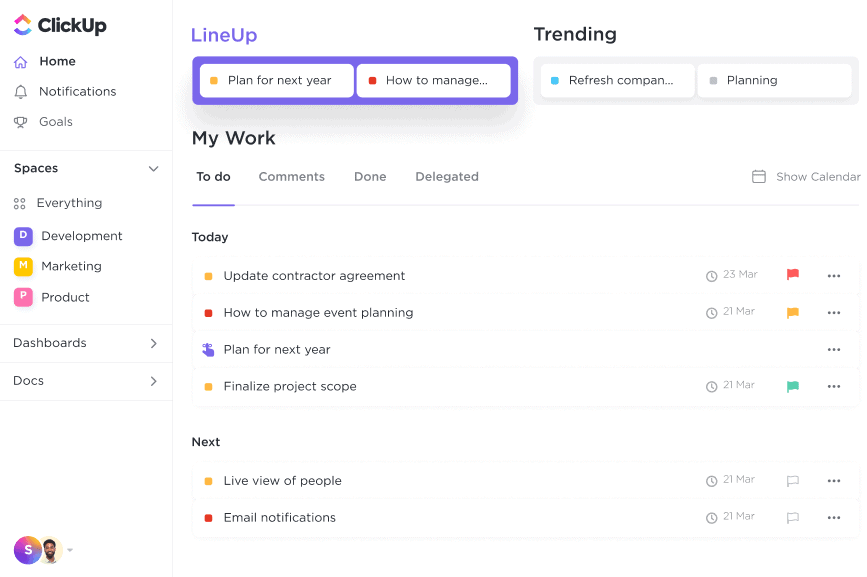
Where ClickUp shines is its features for task management. Users can build custom statuses for tasks based on those tasks’ operations. For example, a content team might want to set statuses for article drafts to be reviewed, while a dev team might need statuses for checking code and deploying it. Custom statuses allow users to design project-specific process checkpoints.
Image credit: ClickUp
ClickUp users can also set dependencies for tasks. If one department uses the waterfall methodology for project management, they’re able to tie one task to another. This helps teams to mark and visualize the relationships between tasks.
Multiple business reviewers found that the interface was intuitive and easy to use—it just may take time to understand for users who don’t have experience with project management tools. For extremely inexperienced PM software users, Asana may be difficult to learn to navigate. Some users also mentioned that they receive frequent email notifications from Asana, which can clutter the inbox.
Some Asana integrations include Zoom, HubSpot, Slack, and Gmail. Project and task updates can be configured to automatically populate a Slack channel, which speeds the communication process for team members who use Slack more regularly than Asana.
Multiple user reviews said that ClickUp sometimes lags; also, while the ClickUp team regularly adds new features, this can result in bugs. Including more functionality in your instance of ClickUp may require more time for users to grow accustomed to the features. ClickUp demo videos are available for customers to study different sections of the software.
Notable ClickUp integrations include Slack, Google Drive, Apple Calendar, and GitHub. If your project teams use GitHub repositories regularly, consider ClickUp—developers are able to view commits and merges from code repositories within their ClickUp tasks.
Both Asana and ClickUp offer mobile applications that support Android and iOS. Teams that need to manage projects on the go or outside traditional office spaces will benefit from mobile access to tasks.
Asana vs. ClickUp: Customizability
Asana allows multiple views, and different users can choose which one works best. It supports agile projects with features like Kanban boards.
Asana also offers project templates that are categorized based on department activities. Asana’s wide range of templates allow different departments to customize their projects based on their specific operations. These include:
An editorial calendar. Content teams can track their writing and production with statuses customized for publishing.
Account tracking sheets. Finance departments can use Asana to manage accounts and tag team members on specific items.
Engineering product roadmaps. Engineering managers can create a roadmap and present it to their teams and to business leaders, receiving approval or commentary on each stage of the project.
Image credit: Asana
Multiple users pointed to ClickUp’s customizability. Because it’s designed to replace other business apps, it’s a multipurpose tool for communication, dashboard reporting, and collaboration.
ClickApps are applications within ClickUp that provide additional functionality for users, such as screen recordings that can be shared to ClickUp tasks and custom fields within tasks. These apps allow users to further customize their tasks based on the work style that’s most convenient for them and improve visibility for the rest of their coworkers who need to view or complete a task. Note that ClickUp requires workspace owners or administrators to enable or disable ClickApps.
Image credit: ClickUp
Reviewers said they were able to choose how much they customized ClickUp based on the functionality they needed. This is also a helpful feature for inexperienced tech users who may not be able to customize all features immediately.
Asana vs. Clickup: Pricing
Asana’s free plan is available for up to 15 users and is free forever. Consider Asana’s free option if you have a smaller team; it includes features like time tracking application integrations, both the iOS and Android mobile apps, and unlimited file storage for files up to 100 MB.
Asana’s paid plans (billed annually) include:
Premium — US$10.99/user/month
Business — US$24.99/user/month
ClickUp’s free plan allows unlimited members and includes features such as unlimited tasks, two-factor authentication, and native time tracking. Both startups and larger teams that don’t need enterprise-level features benefit from the free plan. ClickUp’s other plans include:
Unlimited — US$5/user/month
Business — US$12/user/month
Business Plus — US$19/user/month
Enterprise (pricing available through quote from vendor)
Asana vs. ClickUp: Which is right for you?
Both ClickUp and Asana are fantastic project management tools for smaller businesses because of their extensive free plans, task management features, and options for customizing individual user workspaces. ClickUp and Asana are similar products, but it’s important to choose the tool better suited to the needs of your business’s teams.
ClickUp is suitable for all business sizes. Its high levels of customization and many task management options would be a worthwhile investment for larger companies and departments, and its free plan and low prices make it a good choice for small businesses and startups that are willing to take the time to learn the tool. If your project teams want to put more attention to detail into organizing tasks, ClickUp has plenty of room for creativity and customization.
If your team is less experienced with project management tools and needs something simpler to begin their project journey, consider Asana. Its variety of task views allows new users to choose the layout they most prefer. Because Asana integrates with multiple popular business applications, it’s a good choice for inexperienced teams that use tools like Slack.