Saturday, May 21, 2022

How to Use a Project Tracker: Tips, Software & Resources

Image source: Getty Images

With the right resources, your projects can show stronger results. Here we outline project management software tools to help you track your projects more efficiently.

Every project involves four essential project management basics:

  • Project scope: This refers to the nature of the project. What are the goals? What’s the size of the project, and what elements comprise it? What’s required to complete it? The project scope covers all these areas.
  • Resources: Every project requires resources to get the job done. This could be people, equipment, or other items needed to complete the project.
  • Time: Depending on the scope, the project could take days, weeks, or longer to complete. Since the project timeline affects business objectives and vice versa, it’s important to understand when a project can be completed.
  • Budget: Every project has a cost. Understanding that cost affects project profitability.

Tracking and managing these four elements is the template for achieving the desired outcome of a project management plan. For instance, meeting the project scope but failing to do so on time grants competitors an opportunity, like being first to market with a similar solution. And project management tracking becomes progressively more difficult as the size and complexity of the project grows, increasing the risk of failure.

That’s where project management software saves the day. This specialized group of project management tools alleviates the challenges in tracking and managing the four key project elements.

Why do you need to track your project progress?

Some may ask why tracking project progress is even necessary. After all, it can seem like administrative overhead. And it might be for a simple project that takes just a few days and involves one or two people.

For larger projects that can take weeks or longer, and are comprised of several people, project tracking becomes critical. It increases the likelihood of a successful outcome by delivering these benefits:

  • Improved communication: Many projects involve groups of people, both those who work directly on the project as well as stakeholders who need to know how the project is doing but aren’t involved, like the CEO of a company. Documenting the project plan as well as progress against that plan is an effective tool to communicate where things stand to all groups. Moreover, it identifies when challenges arise, such as falling behind schedule, so that everyone is aware and can find solutions.
  • Efficient resource management: To complete a project on time and on budget, you’ve got to manage your resources. This means team members are assigned work so they know their responsibilities and deadlines, which also ensures work does not overlap across staff. In addition, project tracking allows visibility into factors like when necessary equipment will become available, which can affect project timelines and priorities.
  • Better scheduling: With project tracking, you assign each task estimated timeframes for completion and schedule these tasks so that milestones and deadlines are met, ensuring a project adheres to its timelines.
  • Superior budget management: As part of the project tracking process, actual expenditures should be monitored and compared against estimated costs to confirm budgets are adhered to. This enables the team to adjust during the course of the project if expenses get out of hand, so that by the end of the project, the team has met the project cost requirements.

How you can track your project

Project management is fortunate to have a wide array of software tools that make project tracking a breeze. Gone are the days when a spreadsheet is your only option.

Here’s a summary of some excellent and well-known software tools to track your project. Let’s dive into how each can help.

With Podio

Podio is a strong option to meet your project tracking needs. It contains all the core functionality involved in the project management steps, such as time tracking and budget reports.
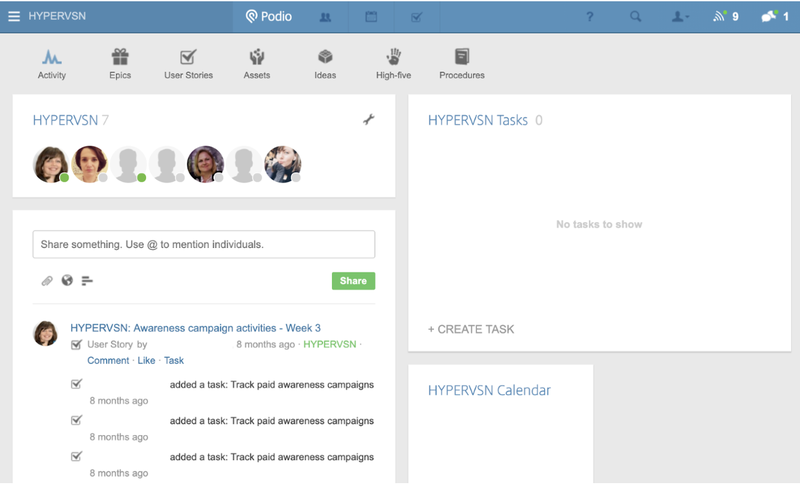
Podio dashboard with tiles to represent team members, tasks, calendar, and comments.

Podio’s main dashboard is simple, allowing for easy navigation. Image source: Author

Source: Podio software.

In addition, if the software lacks a feature you require, its customization capabilities mean you can add it.

With elements like team dashboards, chat features, and a shared team calendar, Podio supports communication and collaboration across project members.

It even offers a free basic version of the software, giving you the opportunity to try Podio before upgrading to a tier with more features.

With monday.com

As a project progress tracker, monday.com is a solid choice. Its functionality covers all phases of the project life cycle. It has many of the same features as Podio, such as budget reports, time tracking, and shared team calendars, and it combines these into a nice user interface (UI).
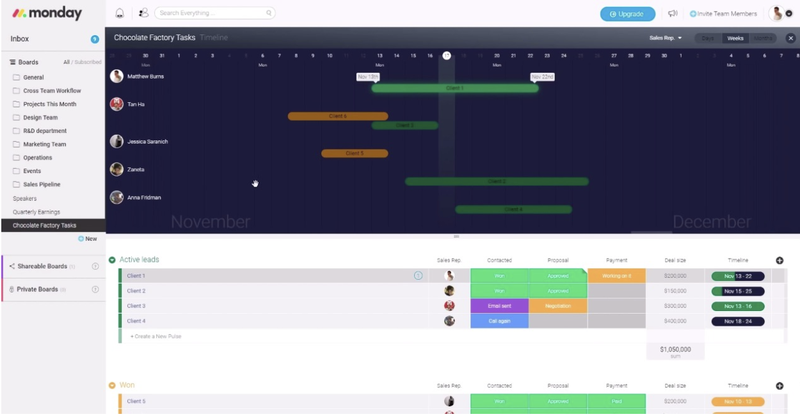
monday.com's timeline showing estimated time of different projects and assigned project leads.

monday.com offers nice visualizations of your projects like this timeline system. Image source: Author

As a result, monday.com is a complete project management tracking tool, although it lacks the free option provided by Podio.

With Wrike

Like Podio and monday.com, Wrike possesses the essential functionality needed to successfully execute projects. Wrike offers a free version with limited features akin to Podio.
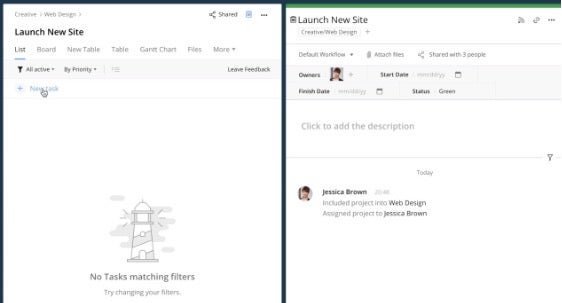
Wrike's task creation window with project tasks on the left and details of each task on the right.

Wrike’s task management system consolidates all work in one spot. Image source: Author

Source: Wrike software.

In addition, Wrike gives users flexibility in how they want to track projects, with traditional task lists, a Kanban board, or other tracking methods which are built right in.

It does include a drawback: you’ve got to be online to use its desktop version.

With Airtable

When it comes to using Airtable for project management, it definitely has everything you’ll need. Airtable’s chief strength is its beautifully-designed UI. Its task tracking employs a gallery feature to make the process visually appealing.
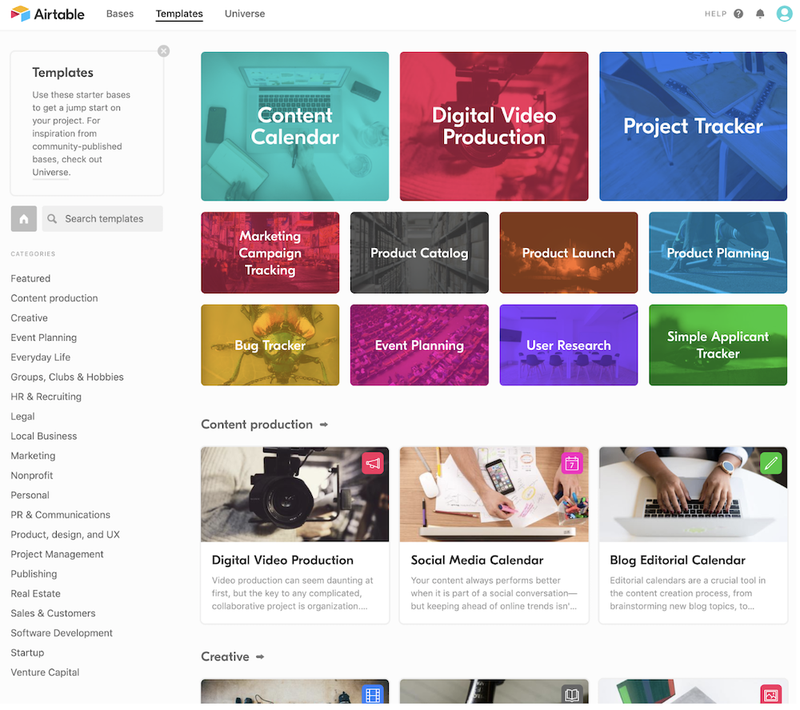
Airtable template page with categories to select an appropriate template for your project type.

Airtable provides a wide breadth of templates to simplify kick-starting your project. S Image source: Author

ource: Airtable software.

While the software covers what’s needed for managing and tracking any type of project, its built-in tools and templates are particularly fitting for the needs of marketing and ad agency teams.

With Jira

Jira is ideal for teams working on a software development project. That’s where its roots lie and where it continues to show strength even though it could be used for other types of projects since Jira supports the work breakdown structure framework.

So it’s no surprise many companies building software products use Jira. Why it’s particularly apt for such projects is that it’s designed to complement the workflows of an Agile software development methodology.
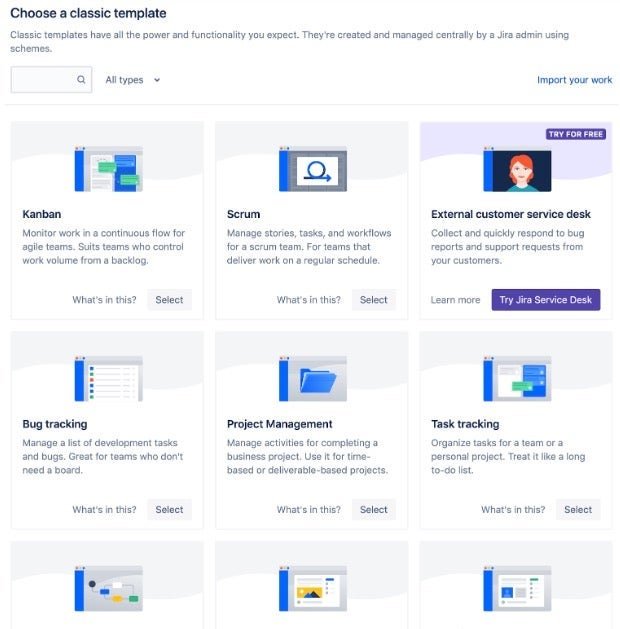
All template options Jira offers for your project

The Jira setup screen gives a sense for the types of teams and projects its intended for. Image source: Author

For instance, work is intended to be broken down into sprints and assigned story points. As a result, it’s pretty robust for its intended use. I’ve used it at different companies to great effect.

But if you’re not working on a software project or using Agile methodologies, avoid Jira. You’ll quickly become frustrated by its lack of features for broader project management applications, like no budget management, and its reporting designed around Agile software topics like its burndown report.

With Scoro

Fully-featured Scoro delivers all the important project management tracking features found in rivals like Podio.

Capabilities such as time and budget tracking become more robust thanks to Scoro’s strong reporting. This comes through immediately upon logging in and viewing its default dashboard, which is packed with information.
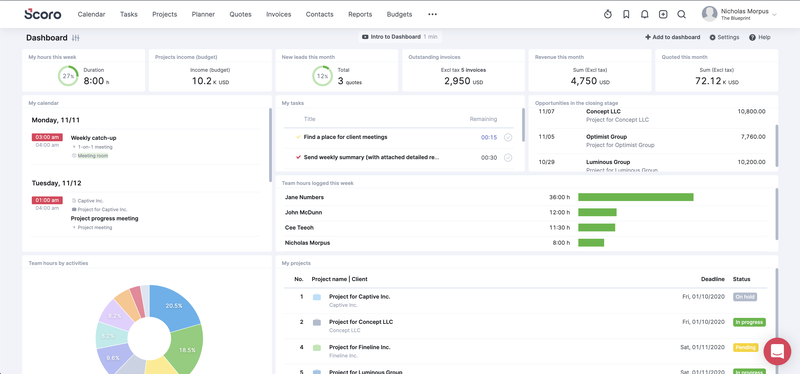
Scoro project management software main dashboard with metrics for hours worked and how they were spent, all displayed with various graphs and charts.

Scoro’s dashboard provides a thorough view of a project. Image source: Author

Source: Scoro software.

Scoro is a great tool, but consequently, it comes with a high price tag.

With Microsoft Project

This is one of the oldest project management software products on the market, and as such, Microsoft Project is worth a mention. It’s essentially an interactive Gantt chart, a type of bar chart that illustrates a project schedule. This is its strength and weakness.

If you’re looking for software that provides a project tracking template in the Gantt format, this is not a bad option, particularly if your company is already using the Microsoft Office suite since Project integrates with the rest of Microsoft’s products.
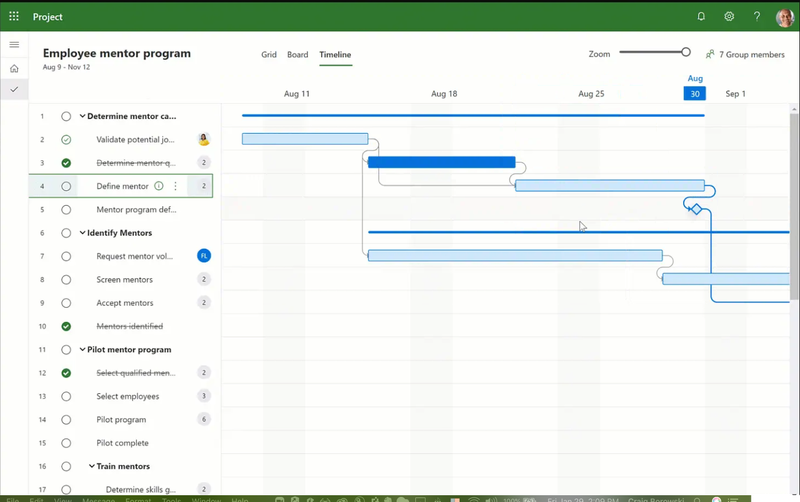
Project tracking screen in Microsoft Project

Microsoft Project offers the familiar menu and taskbar options seen in Microsoft’s other software. S Image source: Author

ource: Microsoft software.

Project once lacked features available from other software tools on this list, but it’s undergone updates. It’s now a more robust project management tool, offering options such as integrations with other apps to extend Project’s capabilities.

With TeamGantt

A stronger alternative to Microsoft Project is TeamGantt. As its name suggests, the software delivers interactive Gantt charts as its core project tracking experience, but with an easier-to-navigate UI than Microsoft Project.

It also offers collaboration and communication components to facilitate teamwork, time, and resource management features, and a simplified reporting toolset, making it very user friendly.
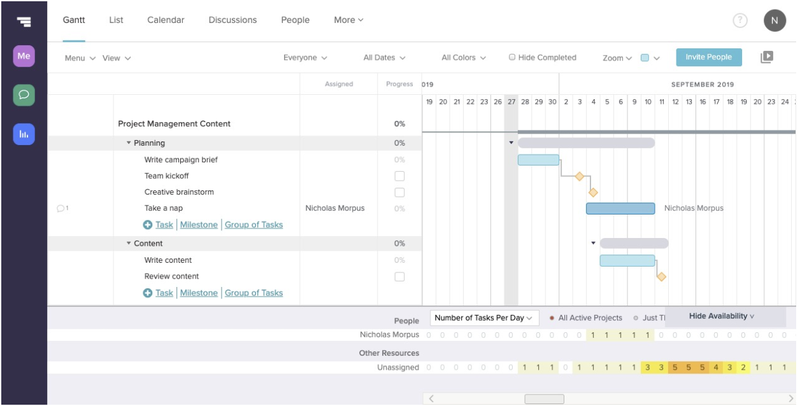
TeamGantt's gantt chart view showing a project, its steps, project owners, and estimated timeline.

TeamGantt’s take on the traditional Gantt chart delivers a clean, user-friendly interface. Image source: Author

Source: TeamGantt software.

So while other project tracking software can be a project in itself to use, TeamGantt avoids this pitfall.

That said, it lacks budget management features and is expensive, although it does provide a free version with limited capabilities.

Tips for using a project tracker

As you can see, the software options to track and manage projects is pretty varied.

In fact, it can become overwhelming, so let’s touch on how to make the project tracking tool work for you, and not the other way around.

Tip #1: Make sure it meets your needs

Project tracking software is only valuable if it helps you accomplish your goals. If you require the software to track expenses, it’s got to be able to do that or it’s adding a burden rather than helping.

So outline your needs first by listing the key features you must have versus those you can live without, then find the software that meets all of your key needs.

Tip #2: Ease of use is essential

Projects are fluid and ever changing. Priorities shift, task completions get delayed, unexpected challenges arise.

But if making updates to your project plan to reflect these changes is onerous, then your project tracking software is not doing its job. Therefore, pick software that allows you to make quick, easy changes.

Tip #3: It should facilitate communication

The one essential element to any project’s success is communication.

Project tracking software should make this easy with reports that can be downloaded and shared, a dashboard or other means for team members to quickly see the status of their tasks and the project overall, and alerts to help those on the project know when a deadline is missed, changes to a task occurred, or a key milestone is approaching.

That way, you don’t have to constantly live in the software to know what’s going on.

Final advice about project tracking

No one wants cumbersome project tracking software. So if you’re spending twenty minutes trying to figure out how to run a report, that tool needs to go. But you don’t want to discover this when you’re in the thick of your project.

That’s why it’s worth the time to test drive project tracking software through free trials or free basic versions, despite the lack of features. Hands-on experience is the only way to truly know if the software is going to help or hinder.

You’ll get a sense for whether or not the tool fits your needs, and can then commit to paid versions, confident that the project tracking software will help you achieve a successful outcome.


https://ift.tt/jnzkr9A
https://ift.tt/ECnBZTA

Government of Alberta to invest $18.7 million in tech innovation over three years

Article content

The Government of Alberta is betting on tech.

Article content

As a part of Alberta’s Recovery Plan, the province has announced it will invest $18.7 million over three years in the eight regional innovation networks (RINs) to foster and support high-potential startups and entrepreneurs, help diversify the economy, and create jobs.

“Alberta has some of the most ambitious and industrious entrepreneurs anywhere. We want to ensure they can get connected with regional innovation networks where they can draw on world-renowned business and technical experts to accelerate the growth of their businesses, diversify the economy and create jobs,” said Doug Schweitzer, Minister of Jobs, Economy and Innovation.

RINs started as part of the 2008 provincial Action Plan for Bringing Technology to Market. Their purpose is to connect and provide support to more than 1,600 technology entrepreneurs from around the province every year. Originally, there were three such networks. Today, there are eight. These community-based organizations have helped 7,000 innovators, entrepreneurs and companies, leading to 354 new innovations to date.

Each RIN helps small and startup technology firms bring their products and solutions to market. They do this by creating a network of programs and services to accelerate the growth of technology-based and knowledge-based businesses. They provide small and medium-sized enterprises with coaching, business advice, technical expertise, connections, and access to capital.

Article content

“Through the regional innovation networks, Alberta Innovates has brought together the power of a network of strong regional supports across the province to create opportunities for small and medium-sized enterprises, entrepreneurs, and innovators to be successful,” said Laura Kilcrease, CEO, Alberta Innovates.

The $18.7 million will be distributed as follows: Calgary Innovation Coalition ($6,946,000), Central Alberta Regional Innovation Network ($1,638,000), Edmonton Regional Innovation Network ($4,888,500), East Central Alberta Regional Innovation Network ($787,500), Wood Buffalo Regional Innovation Network ($735,000), Grande Prairie Regional Innovation Network ($778,500), APEX: Southeast Alberta Regional Innovation Network ($1,785,000), and The Regional Innovation Network of Southern Alberta ($1,171,700).

Each community has a governance committee deciding how the program funding will be used to best reach its desired outcomes. Members of the governance committees include local members from post-secondary institutions, community futures, local economic development offices, tourism, and entrepreneurs.

“The regional innovation networks throughout the province are like the central nervous system of the startup ecosystem in Alberta. Organizations that participate in the RINs are dedicated to building a diverse economic landscape in Alberta by breaking down barriers for entrepreneurs in the province, which is especially important to those who are outside of urban centres. The RINs are there to listen to entrepreneurs and respond to their needs. There is a real sense of collaboration to build new relationships on behalf of innovators, to cross-deliver programs, and to share learnings or best practices that make each RIN stronger,” said Madeline Kendrew, Director of Academy, Platform Calgary.

rhowell@postmedia.com

https://twitter.com/rudyhowellrepex


https://ift.tt/npKArBx
https://ift.tt/gRmejEf

NRN editors discuss the food, technology and sustainability trends

Today on a special episode of Extra Serving, a production from Nation’s Restaurant News, NRN editors Holly Petre, Leigh Anne Zinsmeister, Lisa Jennings, Bret Thorn and Joanna Fantozzi catch up after the first day of the National Restaurant Association Show in Chicago.

The first restaurant show in three years kicked off Saturday, with thousands of operators and exhibitors descending upon McCormick Place. On the first day, NRN editors roamed the floor to get first impressions on the latest industry trends.

Thorn filled listeners in on the latest food and beverage trends, like dragon fruit, which he found in multiple drinks. Petre was impressed by the range of plant-based products, which we previewed ahead of the show. Fantozzi and Jennings caught everyone up on the latest in technology and sustainability, while Zinsmeister recapped her conversations with operators.

In this episode, hear the first of those interviews from the NRA Show floor, as Zinsmeister and Teriyaki Madness CEO Michael Haith talk all things innovation, labor, supply chain and inflation. Come back tomorrow for more from the floor of the restaurant show.


https://ift.tt/npKArBx
https://ift.tt/ftI5mAU

8 event planning business ideas for Africans

According to Display Wizard, trade shows are profitable revenue channels, and Africans can benefit from the rewarding industry. You can get started with knowledge of corporate event planning and trade show practices. However, trade show planning requires creativity, strategy, and extensive sales knowledge.

If you can evaluate and manage companies’ image at an event, this niche idea is for you. Africans can make money by securing vendors and sponsorship for the event, planning it, and ensuring smooth runs. Consider focusing on industry-specific exhibitions and making money from business trade and consumer shows.

According to Works Up, business networking events bring professionals and entrepreneurs together to share ideas, experiences, and advice. Making connections and networking are integral for business owners and individuals, and Africans can benefit.

Consider this idea if you can create event topic ideas, find a great venue, or integrate innovative technologies to make networking efficient. Choosing this event planning niche will allow you to explore opportunities and reap the rewards with excellent communication skills.

According to Eventistry by Alecia, VIP events planning are profitable and an ideal way to create impactful memories that leave a lasting impression. VIP events are popular occasions with rewarding opportunities for planners in this niche. Africans who can collaborate with brands or have high-value sponsors should consider this lucrative event planning niche.

These events can come in different formats, and no matter who attends, Africans can make money from the special occasions through planning. Focus on creating meaningful interactions and connections for rewarding business opportunities.

According to Qcevent Planning, seminal and corporate meeting planning are lucrative and perfect ways to generate revenues. Meeting planners are professionals making all the presentation and meeting preparations for corporate events and seminars.

This idea is for you if you can plan and schedule meetings, inspect event sites, budget expenses, and establish meeting objectives. You can collaborate with small businesses and workshops to discover techniques and strategies to kick start a career. Besides, learning keeps you up with the latest designs and trends.

According to The Balance Small Business, event planning is a lucrative start-up business idea as events can be complex or straightforward. Africans can benefit from the thriving industry with corporate bonding retreat as they are on the trends again.

These events are adventurous, luxurious, and more anticipated, and Africans can earn a decent income by planning these retreats. If you can charter a yacht for a group, book helicopters, or organize authentic culinary classes, this event planning idea is for you. Besides, this idea can quickly become your most preferred source of income.

According to the Event Manager Blog, planning award ceremonies is a quick way to make money in the event planning industry. Award ceremony planning requires creativity, flexibility, and small group work to plan and execute tasks. If you can plan budgets and design events, consider the award ceremony niche.

Most award ceremonies planners charge per event, and you can earn with proper skills and knowledge. You can make money by coordinating transportation and parking, managing schedules, and overseeing the event.

According to Event Brite, planning unique nonprofit and charity events involves defining your cause and getting people to show up and raise money. The job consists of deciding how to accept donations and market charity events to generate revenue.

Africans who can define goals on paper, create budgets, establish a theme, and target audience can make decent money in this industry. Consider this event planning business niche if you can raise awareness and money or increase the number of people participating in an event.

According to In it live, conferences are integral for business networking and professional development as they bring people together globally. Conferences can be multi-day affairs with different hosts and speakers, including A-list artists, professionals, and celebrities.

Conference planning requires creativity and effective strategies for success, and skilled Africans can benefit. Besides, the process involves planning by industry, location, and size, and Africans can earn a decent income from this rewarding industry.

Africans can earn a decent income with a trade show, networking, and VIP event planning. You can make money by attending seminal and corporate meetings, corporate bonding retreats, and award ceremony planning without national barriers. Africans can benefit from these event planning niche ideas with rewarding opportunities. Now you know the best event planning business ideas for Africans, consider researching each concept more in-depth before investing your time and efforts.

*The views expressed in this article are the views of a contributor at Business Insider Africa. It does not represent the views of the organisation Business Insider Africa.

Olayinka Sodiq is a qualified writer with technical, analytical and copywriting experience gained from 5 years of both in-house and freelancing gigs. He is versed in finance, investments, technology, blockchain, mergers & acquisitions, bankruptcy, etc.


https://ift.tt/npKArBx
https://ift.tt/aJ7jLNs

Savannah, GA officials celebrate Bryan County Hyundai auto plant

After a week of poorly kept rumors, Georgia state and local leaders officially welcomed South-Korean automaker Hyundai Motor Group to Bryan County on Friday. 

The company will construct a $5.5 billion manufacturing facility on the nearly 2,300 acre Bryan County mega site, which sits adjacent to Interstate 16 near the U.S. 280 interchange. 

Official announcement:Hyundai to open auto plant, EV battery factory in Bryan County in 2025

Behind the deal:Why Hyundai Motors picked Bryan County megasite for auto plant

‘This is God’s handiwork’:  Bryan County residents, officials react to Hyundai plant announcement

The site will employ 8,100 workers between an electric vehicle assembly plant and an adjacent EV battery factory, making it the largest single economic development project in Georgia history.  

Greeting the crowd of about 300 people, Georgia Gov. Brian Kemp said the announcement marked a historic day in the state’s ongoing success story. 

“We’ve grown accustomed to making history in the number one state for business, whether it’s our unprecedented 3.1% unemployment rate, our record breaking number of Georgians working right now, our record breaking trade and commerce numbers, or any other number of a host of metrics,” Kemp said making the official announcement. 

“And today, we are doing it yet again.”

Timeline:Chrysler to Hyundai Motors, Savannah has courted automaker assembly plants for 20 years

In 2006, former Georgia Gov. Sonny Perdue inked a deal with Hyundai officials for a new Kia assembly plant in West Point, which helped lay the groundwork for this week’s announcement and many in between, Kemp said. 

Georgia Governor Bran Kemp, left, and Jaehoon "Jay" Chang, Hyundai Motor Company President and CEO, have a celebratory champagne toast on Friday May 20, 2022 after announcing a deal for Hyundai Motor Group to build a manufacturing plant in Ellabell Georgia.

“It is clear companies recognize that in Georgia, we do not rest on our laurels, and we will always continue to work towards our future,” he said. 

“And after today, no one can doubt that Georgia is not only leading the great recovery as a whole, but we’re also the unrivaled leader in the nation’s emerging electric mobility industry.”

Hyundai Motor Group 

In a prerecorded video message, Hyundai Motor Group Executive Chair Euisun Chung said Friday was a momentous occasion in the history and the future of Hyundai Motor Group. 

“We are incredibly proud that today we are announcing our plan to open our first dedicated full EV and battery manufacturing facility in the U.S.,” he said, adding that the U.S. has always held an important place in the group’s global strategy. 

Georgia Governor Brian Kemp and Jaehoon "Jay" Chang, Hyundai Motor Company President and CEO, Shake hands after signing an agreement on Friday May 20, 2022 to finalize a deal for Hyundai Motor Group to build a manufacturing plant in Ellabell Georgia.

“… We are proud to partner with the state of Georgia to achieve a shared goal towards electrified mobility and sustainability. We are looking forward to continuing our success story here. Let us enjoy this electrifying ride together.”

Echoing Chung’s message, Hyundai Motor Company President and CEO Jaehoon “Jay” Chang told the crowd on Friday that the manufacturing facility represents a critical next step in the evolution of the Honda Motor Group.

A look at the numbers:Is it any easier to find a home in Bryan or Effingham than Chatham?

“When he decided to build our first fully dedicated EV plant outside of Korea, we chose the United States because America embraces changes and drives innovation,” Chang said.

As temperatures hovered around 90 degrees, Hyundai Motor President and COO José Muñoz proposed a toast to the new development. As Muñoz asked the group, ‘what is the best global auto group in the world?,’ a chant of “Hyundai! Hyundai! Hyundai,” rang out from the crowd, champagne in hand. 

State Sen. Ben Watson 

State Sen. Ben Watson, who represents Bryan County, said the impact of the development stretched far beyond county lines. 

“It is a big win for Bryan County, but I got reminded earlier that this is a huge win for the state of Georgia also. It is my district but it is a joint effort with Bulloch County, Effingham County, Chatham County, and especially Bryan,” he said.  

‘Can’t shut the gate after you come in’:Residents in Bryan, Effingham counties wrestle with growth

Watson said the announcement was a testament to how well the counties and state work together. 

Georgia Governor Brian Kemp celebrates on Friday May 20, 2022 as he officially announces plans By Hyundai Motor Group to build a manufacturing plant in Ellabell Georgia at Bryan County mega-site. The site is located just off Interstate 16.

“I heard from several South Korean officials today that that was actually part of the reason that they chose our area because it was such a well oiled machine and a great package that they had put together,” he said. 

U.S. Sen. Raphael Warnock

The Savannah native U.S. Senator shared his thoughts on Twitter, saying the deal would “help bring more clean jobs to our state.”

U.S. Rep. Buddy Carter

U.S. Congressman Buddy Carter said the thousands of jobs created by the facility is a huge win not only for area residents, but Hyundai, too.

“The people who work here, they are going to just love this company. It’s a great company. And this company is going to love the people of this area,” he said. 

Jaehoon "Jay" Chang, Hyundai Motor Company President and CEO, speaks on Friday May 20, 2022 following the announcement of Hyundai's plans to build a facility on the Bryan County mega-site in Ellabell Georgia.

“They have made a very wise decision, they will find that the people here are dedicated hard working people, salt of the earth people. So it’s just a win-win situation for everyone.”

U.S. Sen. Jon Ossoff

The U.S. Senator from Georgia issued a statement on the news following the announcement, saying he credited months of work behind-the-scenes in getting this deal done for Georgians.

GPA Executive Director Griff Lynch 

Friday’s announcement will also help build an already strong partnership with the Port of Savannah.

“Kia up in west central Georgia has been an amazing partner for many years now. They just celebrated 10 years in Georgia and a million cars. And so to have the Hyundai Group invest again, in Georgia speaks volumes about the relationship they have with the state, the ports and everyone else and so we’re just so excited to continue to grow that partnership,” said Georgia Ports Authority Executive Director Griff Lynch. 

Katie Nussbaum is the city and county government reporter for the Savannah Morning News. Contact her at knussbaum@savannahnow.com. Twitter: KnussSMN


https://ift.tt/OAMZU17
https://ift.tt/qIgEKT1

Farmers Don’t Have Enough Water. Can AI Help?

Opinions expressed by Entrepreneur contributors are their own.

For the fourth time in 10 years, farmers I know in are facing a harsh reality — they won’t see a drop of water from federal government reserves to supplement the little bit they’ll get from Mother Nature.

Water allocations have become a hot-button issue throughout the state, as citizens, environmentalists and farmers fight for their fair share in a drought that’s made it impossible to please everyone.

With no help coming from reserves, farms have been left to draw water from the ground where they can. Working with a fraction of their usual supply, many farmers have no choice but to leave fields fallow, a devastating hit to their bottom line. For smaller farms, that can be the beginning of the end.

But I’ve also seen a very different approach.

Related: The 8 Lessons Entrepreneurs Could Learn From Farmers

Precision — the use of technology like networked sensors and — is helping farmers get by without the water they once had. The efficiencies are real, and the impact is tangible. I’ve seen up close how precision agriculture is making a difference for farms facing extreme drought.

But embracing this technology isn’t always easy. In fact, it requires fundamentally revisiting our relationship with water in agriculture.

From data to delivery

When it comes to irrigation, precision agriculture gives farmers a leg up in two areas — understanding how their water is being utilized, and maximizing delivery to stay alive.

On the understanding front, data is supplementing — and in some cases rewriting — irrigation practices that were developed over generations. Irrigation was, and still is, viewed as an art form. Farmers have long relied on rules of thumb based on visual signs of water stress in crops, or insights gained from working the land for decades. This ultimately led to irrigation being based on a general feeling, and not much more.

But that artform is changing into a science as we gain access to concrete data, both at the level of individual plants and in the aggregate. This data is stronger than the circumstantial evidence they used to base decisions on, giving them the ability to see what used to be hidden. I’ll share an example that’s close to home.

Related: Why Revolutionizing Farming Should Be the Next Space Race

My organization now has more than a billion trees under observation in orchards around the world, with sensors reporting back data every 10 minutes on variables like soil moisture, water absorption, and trunk diameter. With that much information, key correlations emerge that were previously unnoticed. Most of these sensors and the data they collect isn’t new — but they have always been presented separately and required a trained eye and purposeful time to draw out the meaning. That’s precious time growers don’t have.

Now, with immense information available in one place, these systems can anticipate how soil moisture will be affected by factors such as temperature, humidity and wind, and translate that into predictive algorithms. Herein lies the real potential of this technology: a prescription of exactly where to water and when. The result is an ability to maximize “crop-per-drop” at a level unthinkable even a few years ago.

But knowing that a particular row of trees needs water means very little unless you have the technology to get the water there.

That leads me to the second point — maximizing delivery. According to the World Bank, agriculture accounts for about 70% of the world’s water usage, and even the most efficient methods still result in significant wastage.

Here’s where precision agriculture is helping farmers do better. The key lies in pairing those data-driven insights with smart pumps and valves nimble and responsive enough to deliver water exactly when and where it’s needed.

Related: Why We Need An Operation Warp Speed For Agriculture

Currently, farmers have a single valve servicing a large block of trees. Irrigation is controlled by physically sending someone out to the water pump and its control valves. The duration that water is applied is largely determined by how long it takes that person to finish other tasks before returning to the field to shut off the water. also come into play — if the best time to shut the water off occurs after hours, the water often remains on until the next morning. Some fields inevitably get too much water, leaching away nutrients, wasting energy and eroding soil, while others get too little water, compromising plant health, yield and quality. Throw a drought into this formula, and those inefficiencies become an even bigger problem.
With precision agriculture, networked valves and pumps allow for delivering water automatically, providing just enough water, without wastage caused by human factors. In time, with further development of both hardware and software, the large irrigation blocks we know today could be broken down into smaller sections, making it possible to apply water exactly where it’s needed most. Irrigation is well on its way from being a blunt instrument to a resource that can be microtargetted down to a much more precise level.

No way forward without efficiency

These solutions could not come at a better time. While California is in the news now for its three-year drought, water shortages are a challenge familiar to farmers all over the world.

The global population is expected to exceed 9 billion by 2050, which will require a massive increase in food production — all while the world’s freshwater supplies dwindle. It’s an untenable situation, one that’s expected to fuel conflicts in decades to come.

These pressures are already falling squarely on the backs of individual farmers. When you can’t get water through government allocations, you have to buy it from more expensive sources. For farmers we deal with, it’s often one of the largest expenses in their annual budget.

The good news is that farmers adopting precision agriculture are seeing results, with researchers suggesting irrigation based on networked sensors can reduce water usage between 10 and 25%, with variability based on crop type and geography. As technology improves, that number will only get higher. While not a panacea, that boost can go a long way in surviving a drought without fallowing fields or bulldozing orchards.

As food insecurity grows, a serious conversation on how we prioritize water usage is needed. Environmental concerns will need to be reconciled with basic human needs. Decades-old water allocation rules may need revisiting, not to mention outdated policy initiatives. Fortunately, there are concrete, actionable steps that individual farmers can take right now to make a difference. The technology currently exists to do more with less, and there’s no way forward without it.


https://ift.tt/eLOlZf5
https://ift.tt/yXBAaMT

Which Project Management Tool is Best?

I can’t think of a better matchup than Trello vs Basecamp. After writing up comparisons of Basecamp’s alternatives and Trello’s competitors, I figured it was only a matter of time before I covered two of the most user-friendly and simple project management software options on the market.

I love both of these platforms as I’ve used them extensively for all kinds of different projects. Each one has aspects I enjoy over the other, which led to some close calls in these six categories I judged them by.

The truth is if you’re looking for a simple task management platform you can’t go wrong with either of them, but one is certainly better than the other.

Find out whether Basecamp or Trello is the right tool for your team.

Basecamp vs. Trello: An overview

Who is Basecamp for?

Basecamp, originally known as 37signals, was launched in 2004 as a web-based project management tool as well as a private American web application development company named after its most successful tool.

Basecamp is an extremely simple and straightforward project management tool for different types of businesses and professionals. While Basecamp is marketed as a platform for businesses of all sizes, I’d recommend it for either smaller businesses or smaller teams based on its limited functionality.

Who is Trello for?

Trello software, on the other hand, is a streamlined kanban-based project management tool that focuses on simplifying every aspect of your workflow. Like Basecamp, it is a simple platform that doesn’t bog itself down with tons of features, data, and other kinds of complexities.

Trello is limited in its capabilities since it is a workflow tool and not comprehensive project management software. In my view, this tool is best suited for software feature development projects and creative teams that go through iterative or ongoing projects that don’t require much, if any, financial management.

Basecamp vs. Trello: Features

Software features are where you’ll find the biggest difference between these two options. These platforms are based on two entirely different management styles and one offers just a little more functionality than the other.

What Basecamp offers

This tool isn’t a jack-of-all-trades, unlike many of its competitors, but instead is a master of one: simplicity. Basecamp is a basic collaboration tool that offers everything you’d need to coordinate, oversee, and execute project tasks.

These features include task lists, file/document sharing, task comment sections, project forums, automated project check-ins, schedules, and a message board.

Basecamp’s individual task screen is simple, yet straightforward. Image source: Author

Outside of this, Basecamp is a little scant on features. This isn’t a comprehensive project management platform; it’s a collaboration tool. This means you won’t find any native budgeting or reporting tools.

If you’re looking to track budgets or any other kinds of reporting, you’ll have to take advantage of Basecamp’s integrations, which I will dive into later in this comparison, to fill in those gaps.

What Trello offers

When it comes to a short, but powerful list of features, Trello is the perfect competitor to Basecamp. However, instead of boiling down the task management formula to simple task lists, Trello opts for a kanban-only approach for overseeing your project workflow.

In fact, I believe that Trello has the best kanban system I’ve ever seen in a project management tool and that’s saying something.

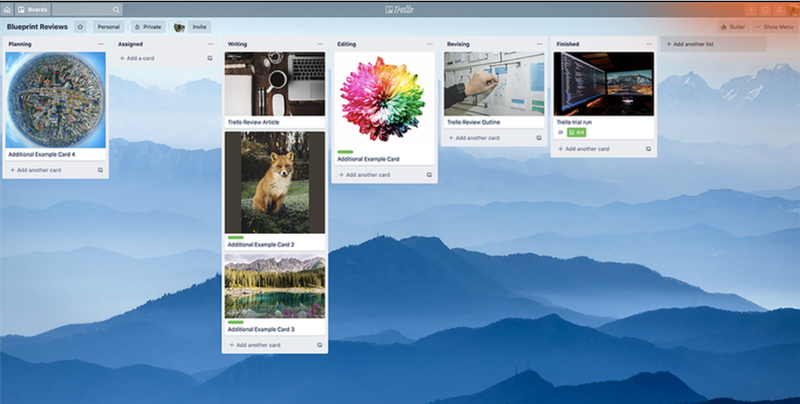
The Trello boards featuring tasks with images.

Trello offers a simple, yet visually compelling user interface. Image source: Author

The task cards are simple to navigate and offer lots of functionality, such as labeling, comment threads, sub-task checklists, file attachments, and external tool integrations. Trello definitely has a leg up on Basecamp when it comes to task functions.

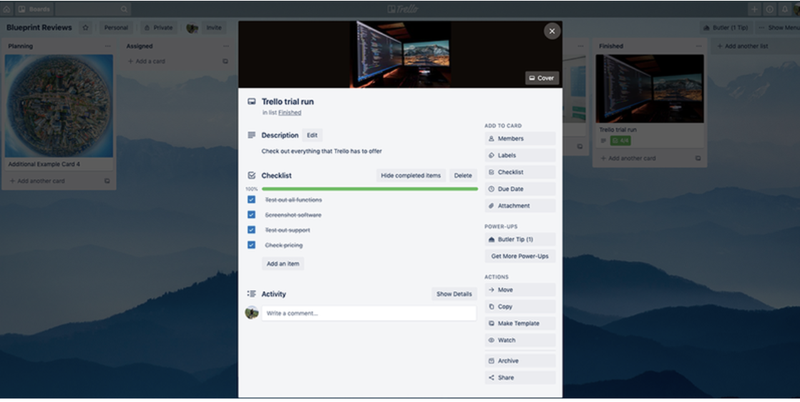
A screenshot of Trello’s window-in-window setup for task cards.

Trello’s window-in-window setup for task cards makes for a streamlined navigation experience. Image source: Author

On top of it all, I prefer Trello’s “window-in-window” setup for checking task cards instead of loading a new webpage for each task as you must in Basecamp.

As for additional functionality outside of the standard task management features, Trello does offer other Power-Ups and outside integrations to make up for the lack of budgetary or reporting tools.

Results

Winner: Trello

Both tools are very similar in their list of features, however, Trello offers just a little bit more in a much more elegant package.

Basecamp vs. Trello: Support

Luckily, both of these tools are extremely easy to learn and use, so customer support isn’t a major concern. That being said, it’s good to know your vendor will have you back when things go wrong.

What Basecamp offers

When it comes to customer support, Basecamp offers everything you would expect from a software vendor, except phone support. It does offer a contact support form that promises a response in 30 minutes or less, which is helpful.

However, that doesn’t replace the convenience of actually speaking to a human being on the phone when time is of the essence.

Of course, considering the extensive tutorials and help guides offered by Basecamp, it seems unlikely there would be many scenarios where you would need to contact support for such a simple tool.

That being said, I can’t speak for every user’s experience and it would be nice to see Basecamp come with some kind of phone support or at least some form of live chat support for its paid users.

What Trello offers

Trello is owned by Atlassian, so if you have any experience using their flagship platform, Jira, you know they have their own unique way of handling customer support.

Most issues you encounter are dealt with using support ticket forms, but if you opt for the Business Class or Enterprise pricing tiers, you also gain access to their priority phone support.

Luckily, Trello also has an extensive knowledge base and blog which covers a wide range of topics including Trello functionality and team management guides. It would be great to see phone support extended to all tiers of this software, perhaps with a priority given to enterprise users.

Results

Winner: Trello

While both platforms share a similar approach to support, the existence of some sort of phone support puts Trello ahead of Basecamp.

Basecamp vs. Trello: Ease of use

This is guaranteed to be an interesting comparison since both platforms have directly competed for the “easiest to use” project management software superlative on The Ascent.

What Basecamp offers

It’s hard to get any easier than Basecamp since the user interface and functionality of this tool are about as basic as it gets. The truth is, you couldn’t get lost while using Basecamp even if you tried.

Everything is clearly labeled, the features list is extremely short, and anything that happens in this software is tracked through a notification system.

Basecamp doesn’t offer any fancy Gantt charts, workload trackers, kanban boards, or detailed reports. This platform is for creating projects, tracking tasks, sharing files, and discussing progress. That’s about it. There’s a charming simplicity to Basecamp, and it’s hard to make a short features list like this difficult to use.

What Trello offers

Trello also benefits from its charming simplicity but in a different way. Instead of deferring to the most basic setup possible, like Basecamp, Trello takes the concept of kanban project management and makes it as accessible as possible.

The interface is incredibly intuitive and if you have even the slightest experience with any project management software, you’ll have no issues picking up this platform within minutes.

On top of that, it’s impressive how Trello is able to rival Basecamp’s simplicity considering its additional features offered in each task card.

Results

Winner: Trello

This was an extremely close comparison, but when I stack up the features offered by Trello against Basecamp’s offerings, Trello wins in the ease of use department. Trello’s developers go above and beyond making a kanban board just as easy, if not easier to understand, than Basecamp’s task lists.

Basecamp vs. Trello: Pricing

It seems both of these tools are vying for the same market, but when it comes down to it, the almighty dollar can be the real deciding factor. Which software is a better value?

What Basecamp offers

In keeping with the trend of simplicity, Basecamp offers a free version of its software as well as only one paid option for a flat monthly fee of $99. The free version does come with certain limitations such as three projects at a time, 20 users, and 1GB of storage space for project files.

The paid version comes without limitations, which is especially beneficial for large teams since a per user structure can add up quickly.

What Trello offers

Trello takes a more traditional approach to their pricing structure:

  • Free: Unlimited personal boards, unlimited cards, unlimited lists, 10MB per file attachment limit, 10 team boards, one power-up per board, 50 automated command runs per month, two-factor authentication.
  • Trello Business Class: $9.99/month per user. All previous features, 250MB per file attachment limit, priority support, custom board backgrounds, unlimited team boards, custom fields, calendar view, app integrations, 1,000 automated command runs per month, advanced admin permissions.
  • Trello Enterprise: Starts at $20.83/month per user with gradual rate decreases as more users are added. All previous features, unlimited command runs, no attachment restrictions, power-up administration, personalized onboarding.

Trello truly shines with its free version that offers unlimited boards, cards, lists, and users. It’s a very generous free option that gives you the ability to seriously test out the software before you commit to a paid version. However, once you move into a paid tier, the bill can add up quickly if you have a long list of users.

Results

Winner: Basecamp

Yet another extremely close competition between these two platforms, but I have to give the nod to Basecamp. The flat monthly fee is especially enticing, which surpasses Trello’s paid versions once you cross the 10-user mark.

Trello does win in the free software department, but a flat monthly fee is exceptionally affordable once your team begins to grow.

Basecamp vs. Trello: Integration with other software

Both Basecamp and Trello focus solely on the task management and collaboration aspects of project management, so it’s important for these platforms to offer outside integrations. Which one fills in the gaps best here?

What Basecamp offers

Basecamp also offers plenty of different integrations that will likely shore up some of the functions not offered by the native software itself. These integrations include:

  • Everhour Reporting
  • Hubstaff
  • Ganttify
  • ScrumDo
  • Akita
  • Zapier
  • Project Buddy
  • And many others

However, Basecamp is missing integrations with major programs like Slack or Mailchimp, which are exceptionally popular tools these days. I believe this is an unfortunate missed opportunity for Basecamp.

What Trello offers

Trello also offers integrations with several different tools, many of which enhance your user experience by filling in the gaps not covered by their collaborative-minded platform. I feel as though this is par for the course for project tools with only one or two purposes in mind. Some of these integrations include.

  • Slack
  • Jira
  • Adobe XD
  • GitHub
  • Google Hangouts
  • Zapier
  • Gmail
  • Mailchimp
  • Dropbox

Results

Winner: Trello

Trello checks off some of the integration boxes missed by Basecamp, such as Slack and Mailchimp.

Basecamp vs. Trello: Getting started

Does the simplicity that these two tools offer carry over into the startup process? Let’s find out which one comes out on top.

What Basecamp offers

Getting started with Basecamp was very simple. There’s a button on its main website, in the top right-hand corner inviting you to start your trial.

Once you click on the 30-day free trial button, you’ll be prompted to enter your name and email address, create a password, enter the name of your company, then select your type of project.

Once you’ve entered all of this information, you are taken right to the main dashboard. It’s that simple.

What Trello offers

Trello’s startup is quite similar to Basecamp with one minor difference. You start off by entering your information, as expected. There is no upfront payment information needed.

Then you choose your industry and management style, making this a great agile tool with some of its Trello sample boards. Once you’re in, you’re given a step-by-step tour of the software and given control of your newly created project, which is the only significant difference.

This is extremely helpful if you aren’t familiar with kanban software, but I doubt anyone would have much trouble learning this platform without the guide.

Results

Winner: Trello

Trello’s addition of a short tour gives it the slight bump over Basecamp (not that Basecamp really needs a tour, but it’s a nice touch).

How They Compare: Basecamp vs. Trello


https://ift.tt/LuDEi4k
https://ift.tt/9hIcgfo